A video prototype for Bracket.
Video Prototype
CapCut, iPhone
A concept video for Bracket, an app for finding and joining sports matches. Designed as a research tool to test whether people would choose structured matchmaking over texting friends to play.
The assignment brief.
Your A5 video prototype has to focus on a NEW service/feature/interaction that does not currently exist. You can create a service/feature/interaction for any product of your choice (and the product itself can be something real or invented too). The point of the video prototype is to allow you to conduct user testing with an imagined feature/service/interaction before it is integrated into a product.
A video prototype is a design research tool — not an advertisement, and not a documentation video. Its purpose is to communicate a design concept clearly enough that a participant can respond to it meaningfully, so you can gather data about the desirability and feasibility of your idea. Every decision you make in producing this video should serve that goal.
You are designing a novel interaction for a health or wellness product. Your video should demonstrate a scenario-based use case — showing how key aspects of the product support a specific interaction — as if you were on a product team pitching a concept for user feedback.
Create a video, maximum 120 seconds, that concisely and effectively communicates your use case. Using the principles and techniques discussed in studio: define your scenario, sketch a storyboard, then shoot, edit, and package your video. Your video must be paired with a data-gathering instrument (e.g., a survey) — collecting participant feedback is a required part of this assignment, not optional.
Select a health or wellness category and design a concept for a new interaction, product or service in that space.
Activity
Nutrition
Sleep
Mental Health
Other Health & Wellness
Do not assume your audience is already familiar with the category. Focus on the mobile or physical product interaction — not a website. You can use physical prototyping techniques (cardboard, fabric, etc.) to support your storytelling if needed. Use live action, not animation, and shoot in landscape orientation.
A matchmaking app for both recreational and competitive sports.
For the main concept of the video, I used a social sports I had previously designed. Bracket targets the coordination and social problem in recreational sports. You want to play, you text friends, and you get no response, or find it difficult to discover sports events nearby. Bracket connects players with personalized preferences through organized events. It fits the activity wellness category because consistent recreational play depends on being able to find an opponent.
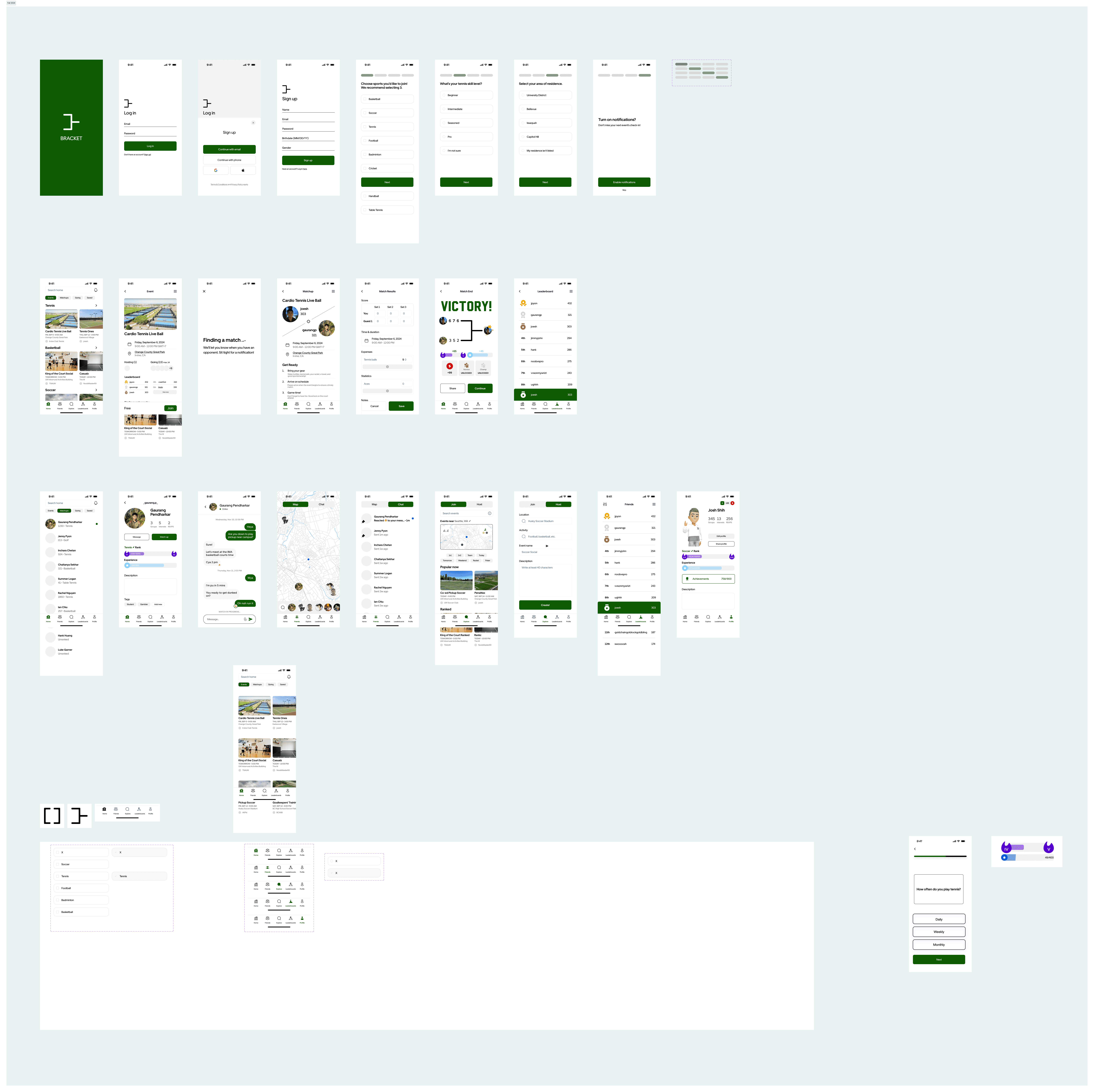
A quick glance at the wireframes made for the concept.
Before filming, I defined four evaluation criteria.
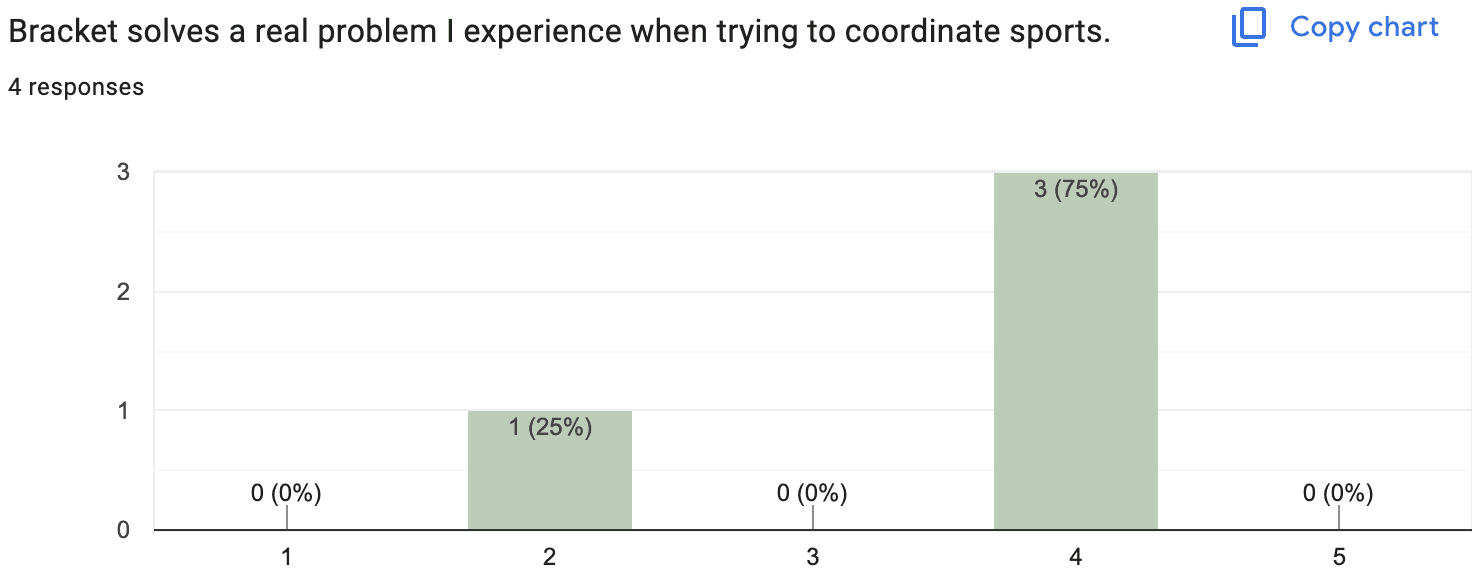
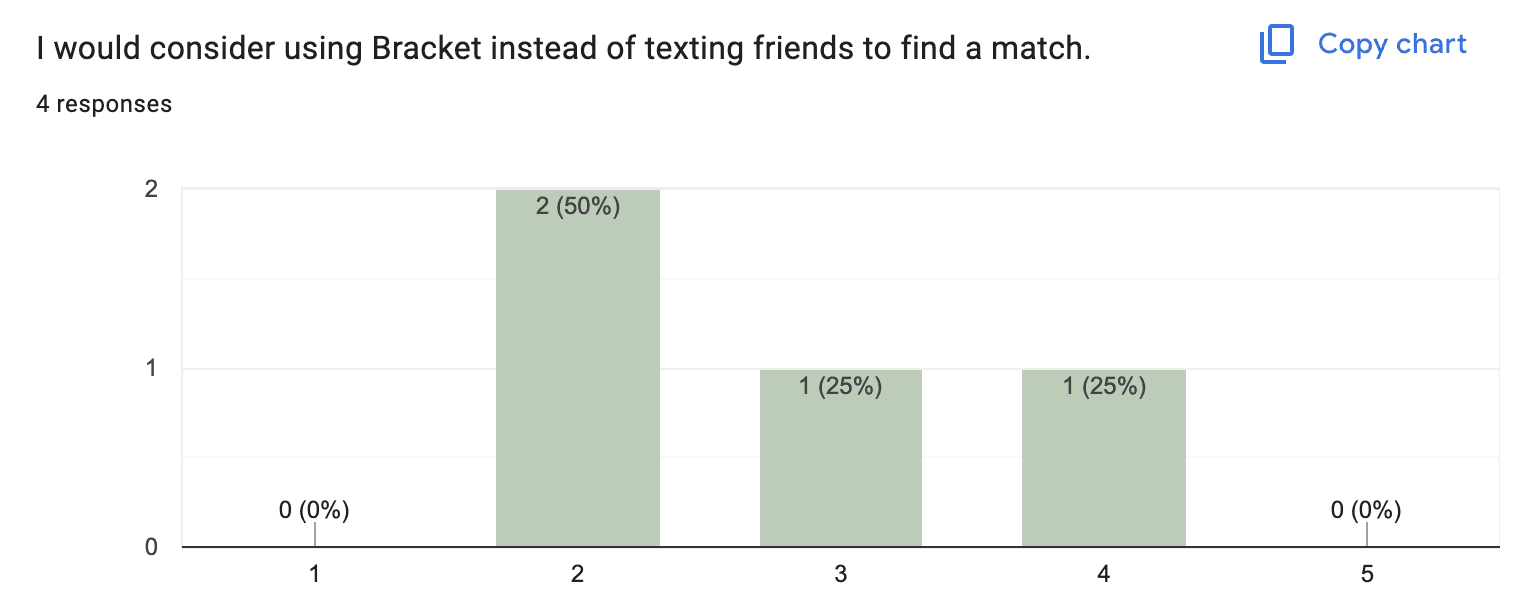
Desirability: would people use Bracket over texting friends to find a match?
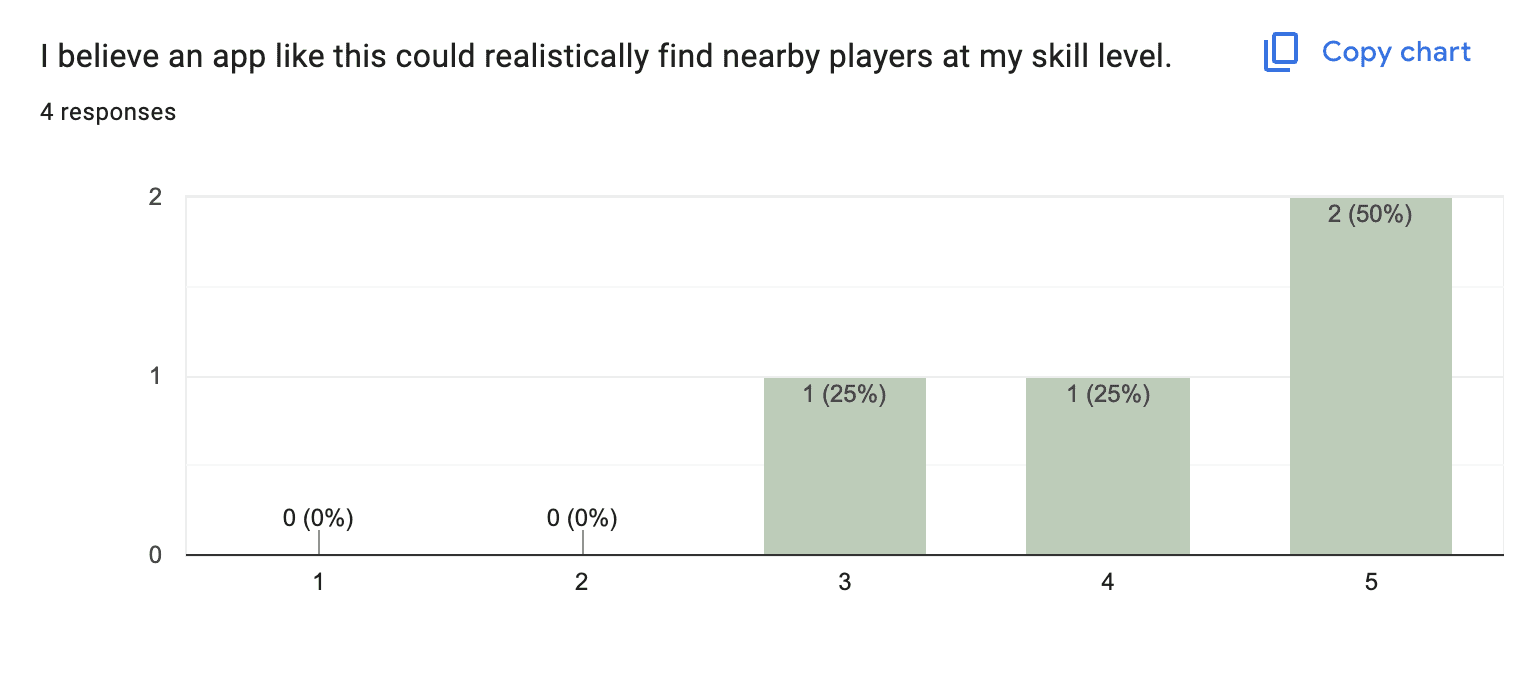
Feasibility: would participants trust that real nearby players would actually show up?
Usability: does the onboarding-to-match arc read clearly without narration?
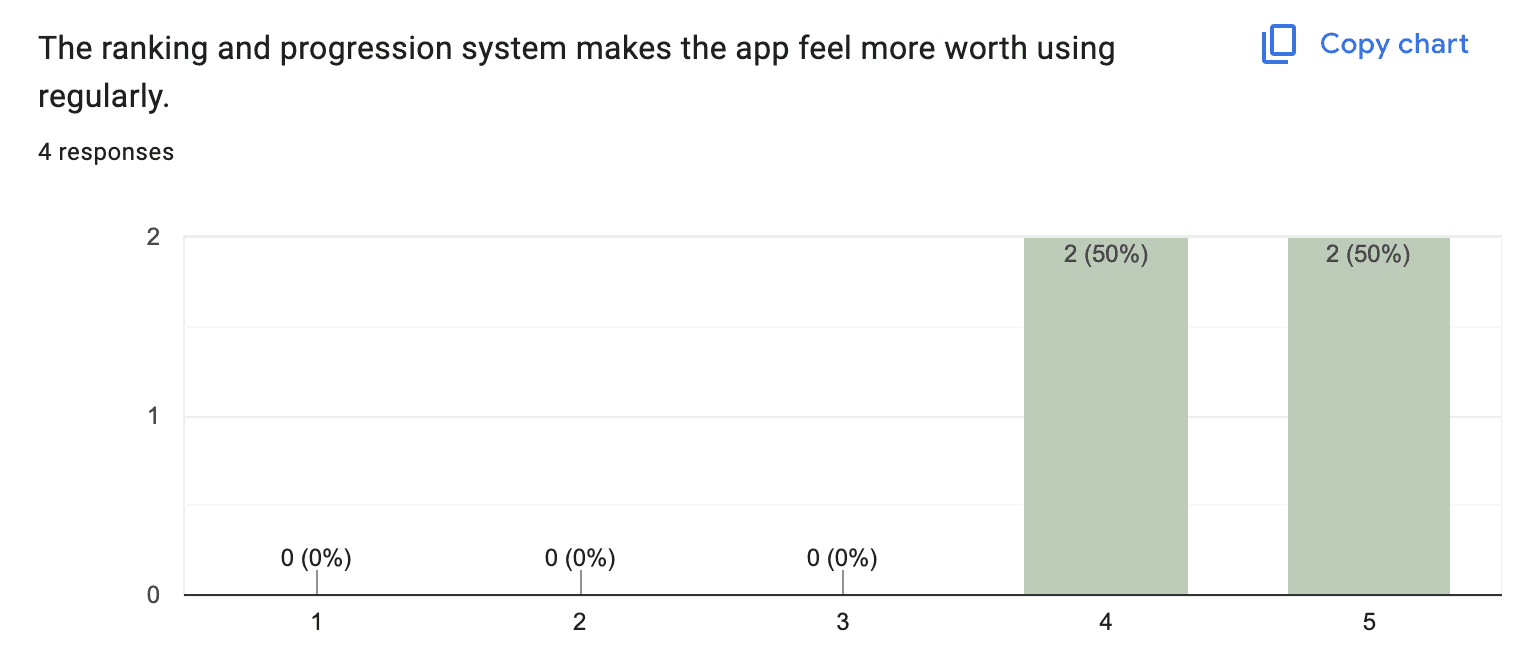
Impact: does the ranking system give players a reason to return after the first match?
The storyboard and final video.
The character is a recreational tennis player who wants to play one afternoon but gets no response from friends. He opens Bracket, completes onboarding, browses the event feed, finds a match, plays, and ends with a ranking update.
Two main turning points carry the video. The response from the character's friend opens the scenario and has to make the coordination problem land. The matchmaking confirmation is the payoff.
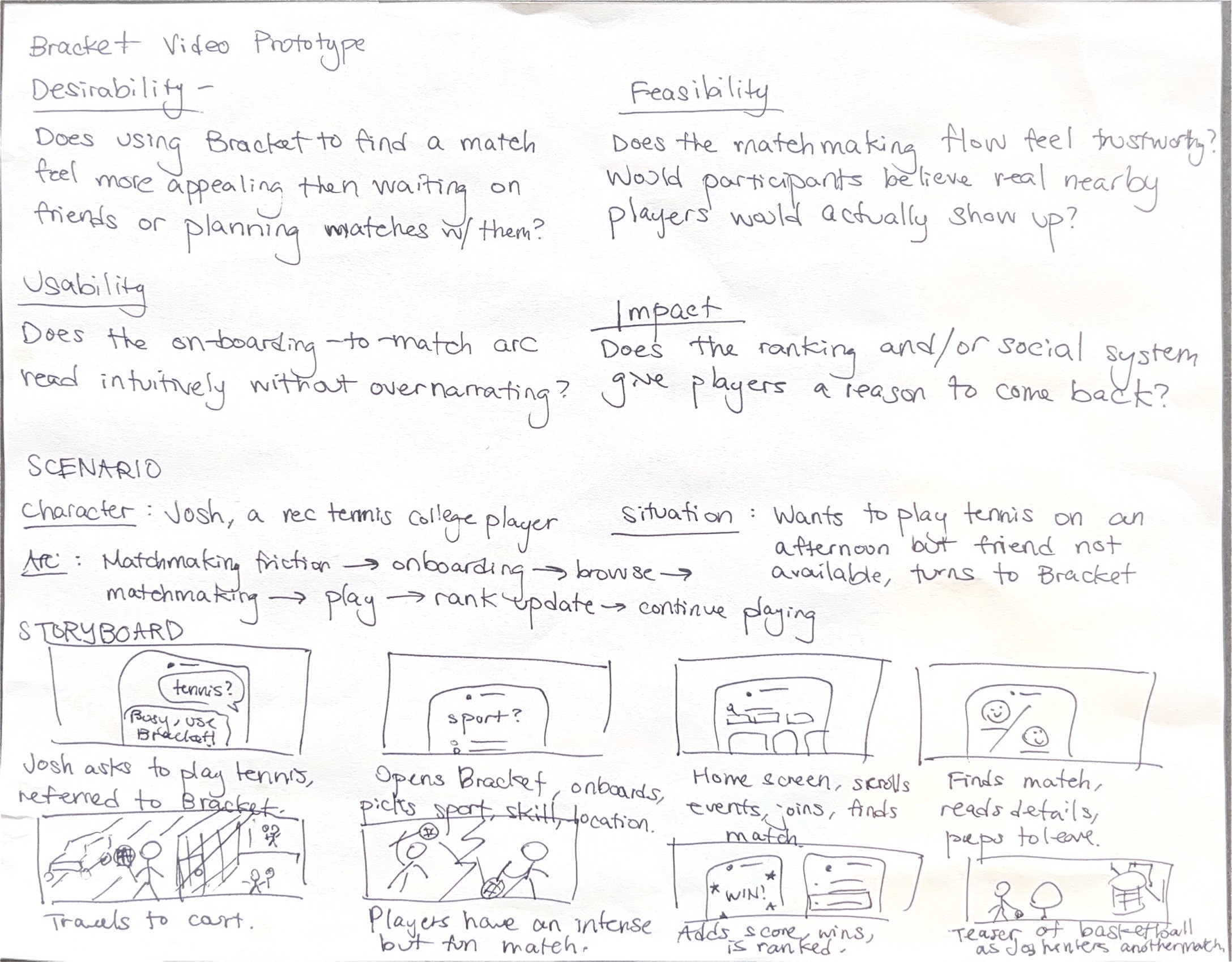
Evaluation criteria, scenario, and storyboard sketch. Character, situation, arc, and shot notes for eight main scenes.
Editing.
The editing process was relatively simple, as I used CapCut. My main challenge was the audio, as I wanted to add timed video changes to the beat of GO! by Cortis.
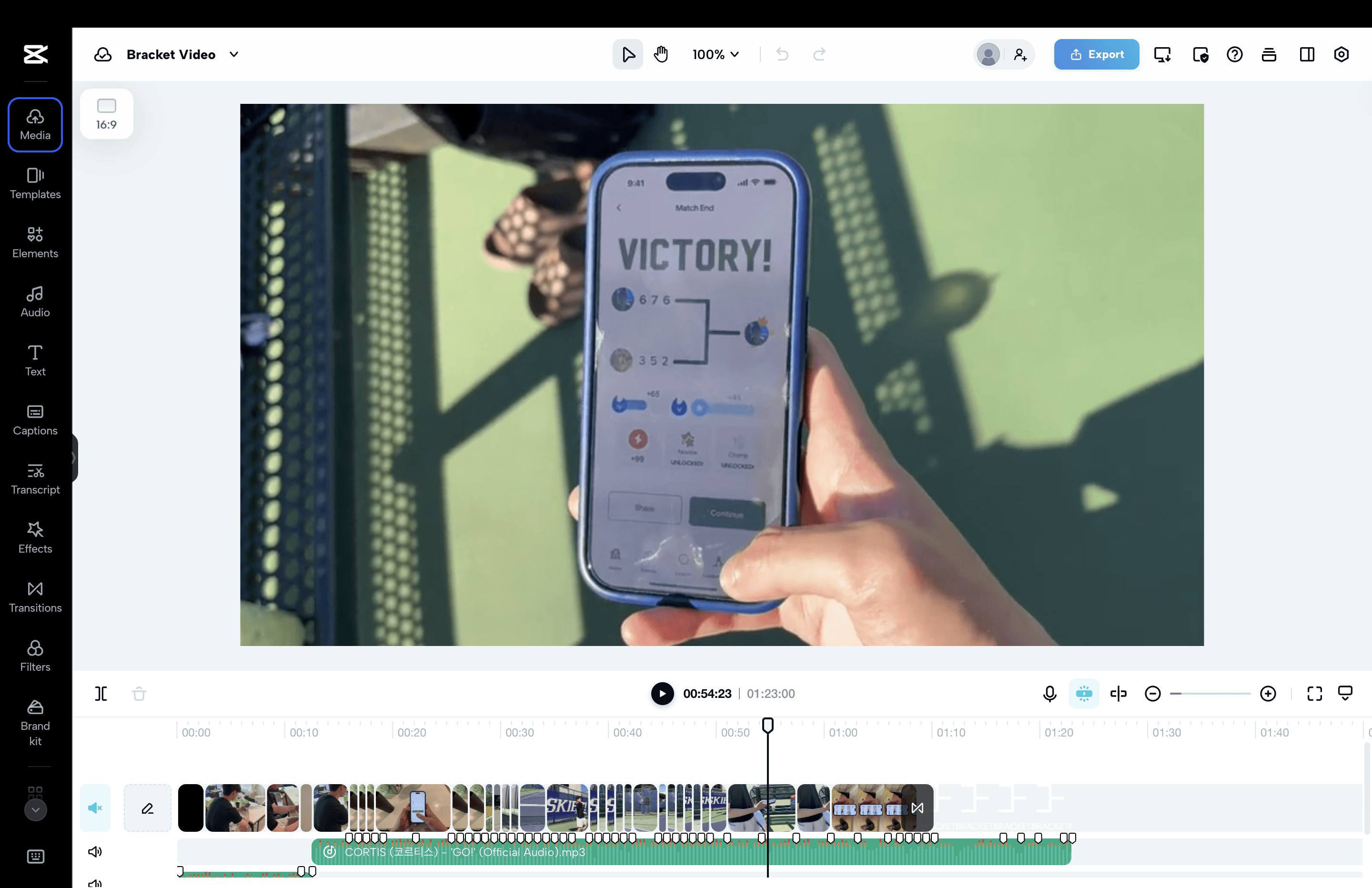
CapCut editing timeline. Final cut at 1:23.
Early findings point to one central tension.
Four participants screened the video and completed a nine-question survey covering comprehension, desirability, feasibility, and impact.
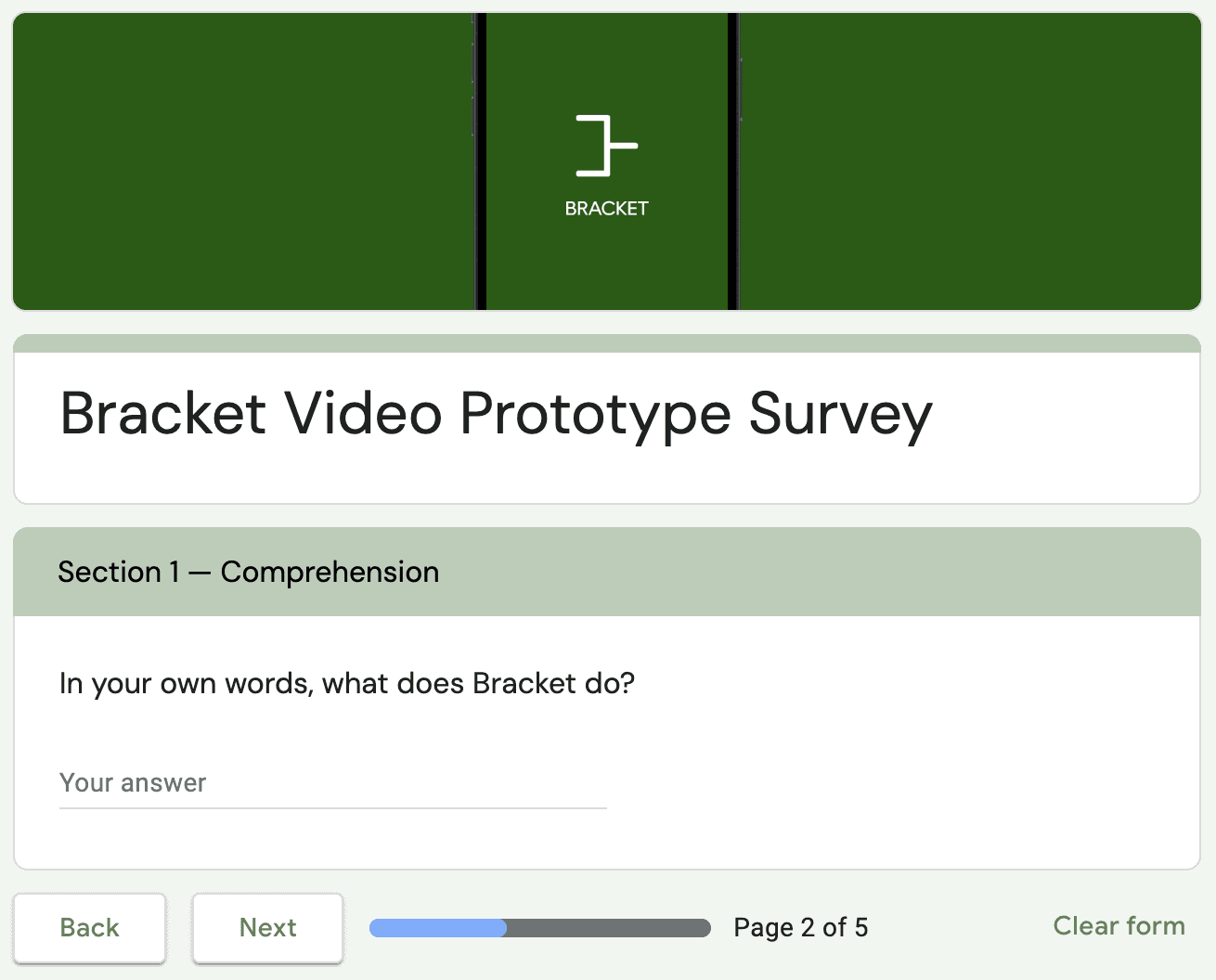
Mapped to the four evaluation criteria:
Desirability scored 2.75/5, the lowest result across all questions.
Participants recognized a real coordination problem but were not ready to choose Bracket over texting friends.
Feasibility scored 4.25/5.
Participants believed the app could realistically surface nearby players at their skill level, and the matchmaking concept read as believable.
Usability was not directly rated but surfaced clearly in open responses.
Three of four participants noted that app screens moved too quickly to follow, indicating the onboarding arc did not read clearly without narration.
Impact scored 4.5/5, the highest result.
The ranking system registered as the strongest reason to return to the app.
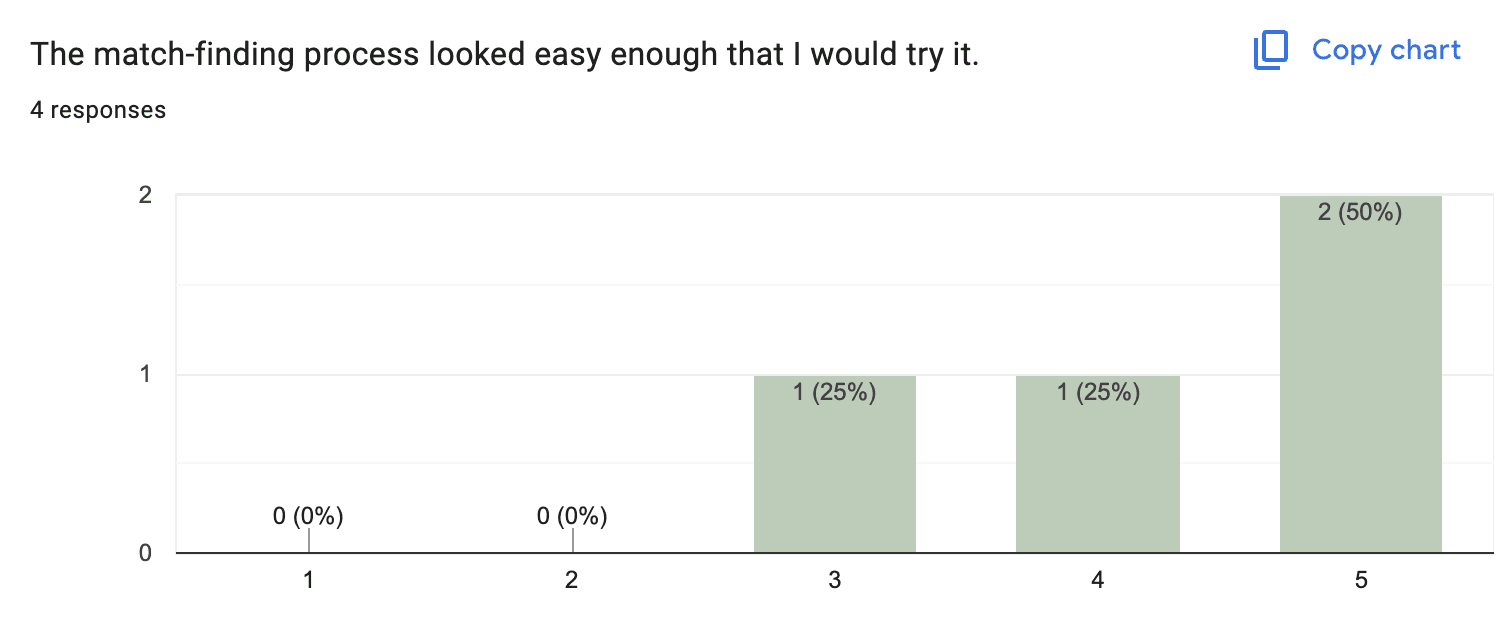
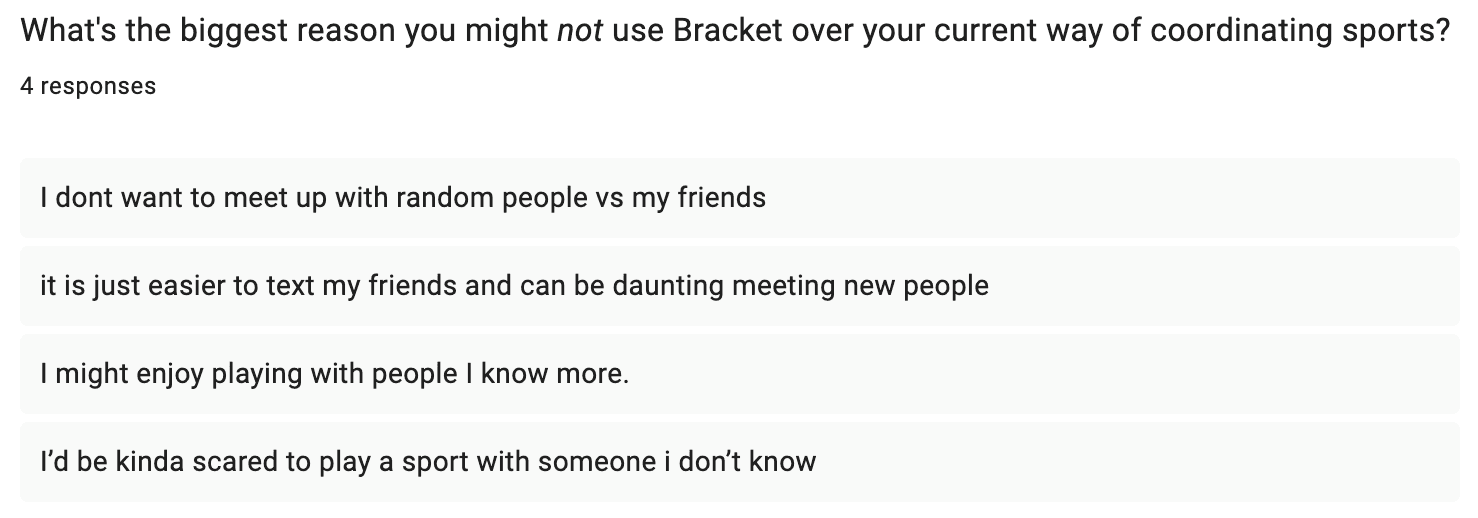
Stranger trust is the core barrier. All four participants cited social familiarity as the primary reason they might not use Bracket:
One said "I dont want to meet up with random people vs my friends."
Another put it more viscerally: "I'd be kinda scared to play a sport with someone i don't know."
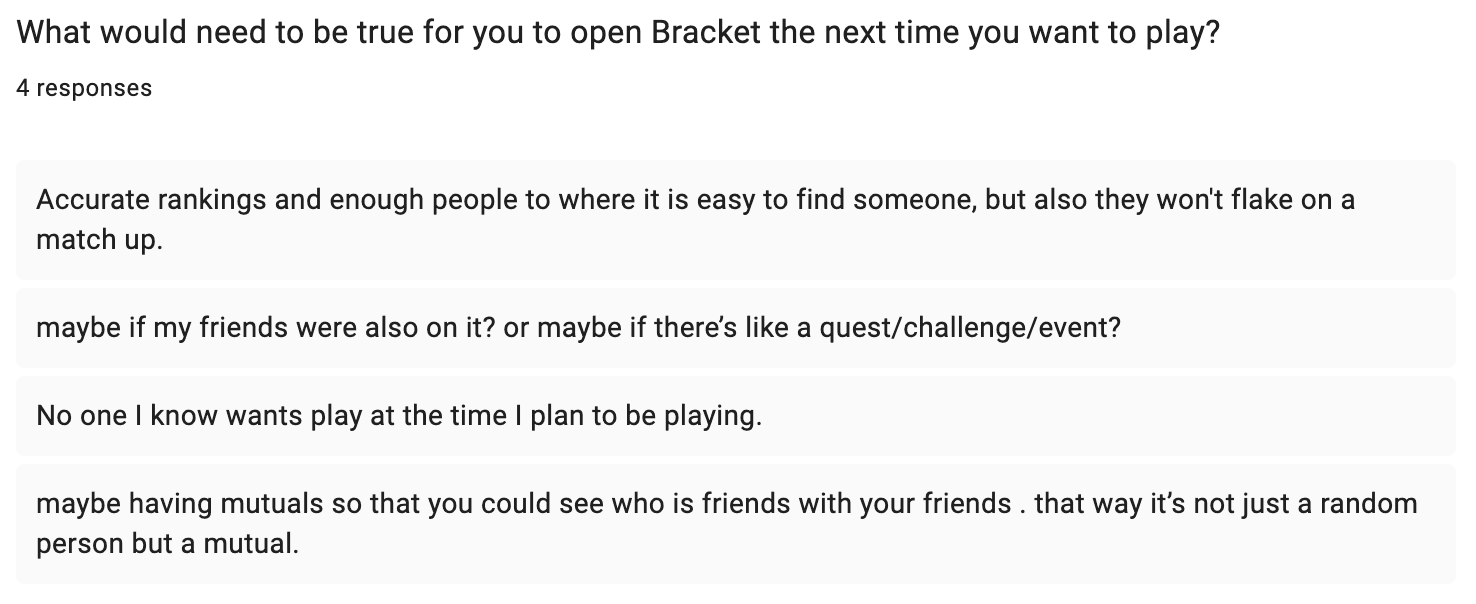
Two participants independently suggested mutual friends as a solution.
One asked "maybe if my friends were also on it?"
The other was more specific: "maybe having mutuals so that you could see who is friends with your friends. that way it's not just a random person but a mutual."
The one condition where Bracket wins was also named clearly: "No one I know wants play at the time I plan to be playing."
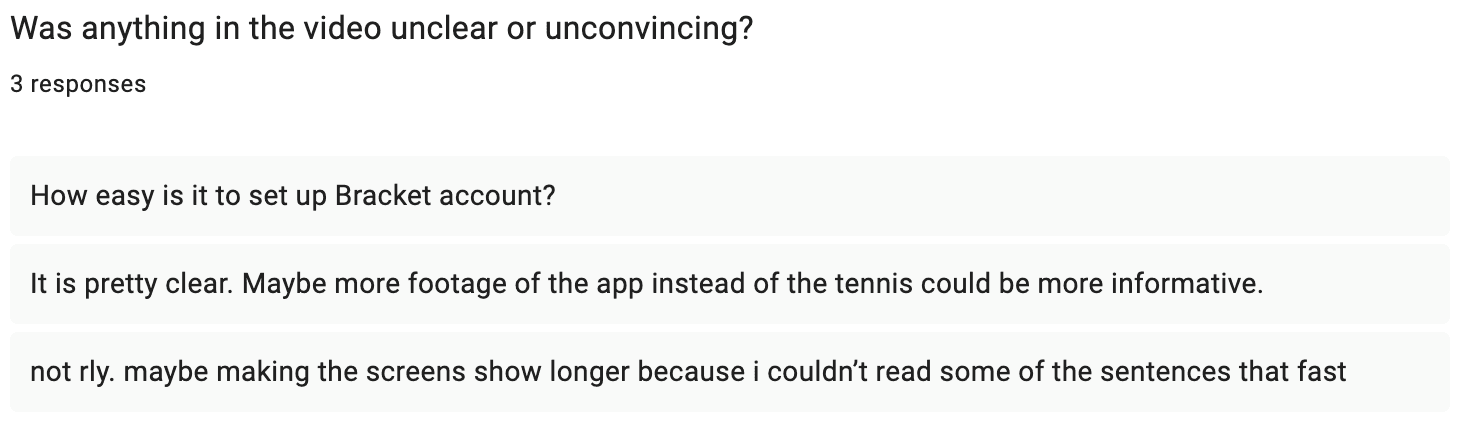
The video showed too much court and not enough app.
One participant asked for "more footage of the app instead of the tennis."
Another left with an open question: "How easy is it to set up Bracket account?"
A third noted "making the screens show longer because i couldn't read some of the sentences that fast."
Three of four participants flagged app visibility in their responses. The video prioritized court footage over app interaction, and participants left without a clear picture of how the product works.
The video raised a question the storyboard didn't address.
The storyboard was built around coordination friction as the central problem. The evaluation revealed that finding an opponent is not the hard part. Getting a stranger to show up and be worth playing is. A next iteration would address this directly, possibly showing the opponent arriving at the court or including a profile verification step in the app flow.
The court footage trade-off was wrong. The tennis shots grounded the video in reality, but participants needed more time inside the app. The next version will hold the matchmaking confirmation longer and compress the court section.
Compositing video footage in CapCut to match the song beat created timeline complexity I hadn't planned for. Mapping clip lengths during the storyboard phase would have made the edit faster.
Overall, it was fun video editing again after a while, and I love how it turned out! I'll take this feedback in as I continue to develop the app.
Note: Claude assisted with drafting and structuring this process log, and published it using the Framer MCP.